A deployment pipeline that ships in seconds
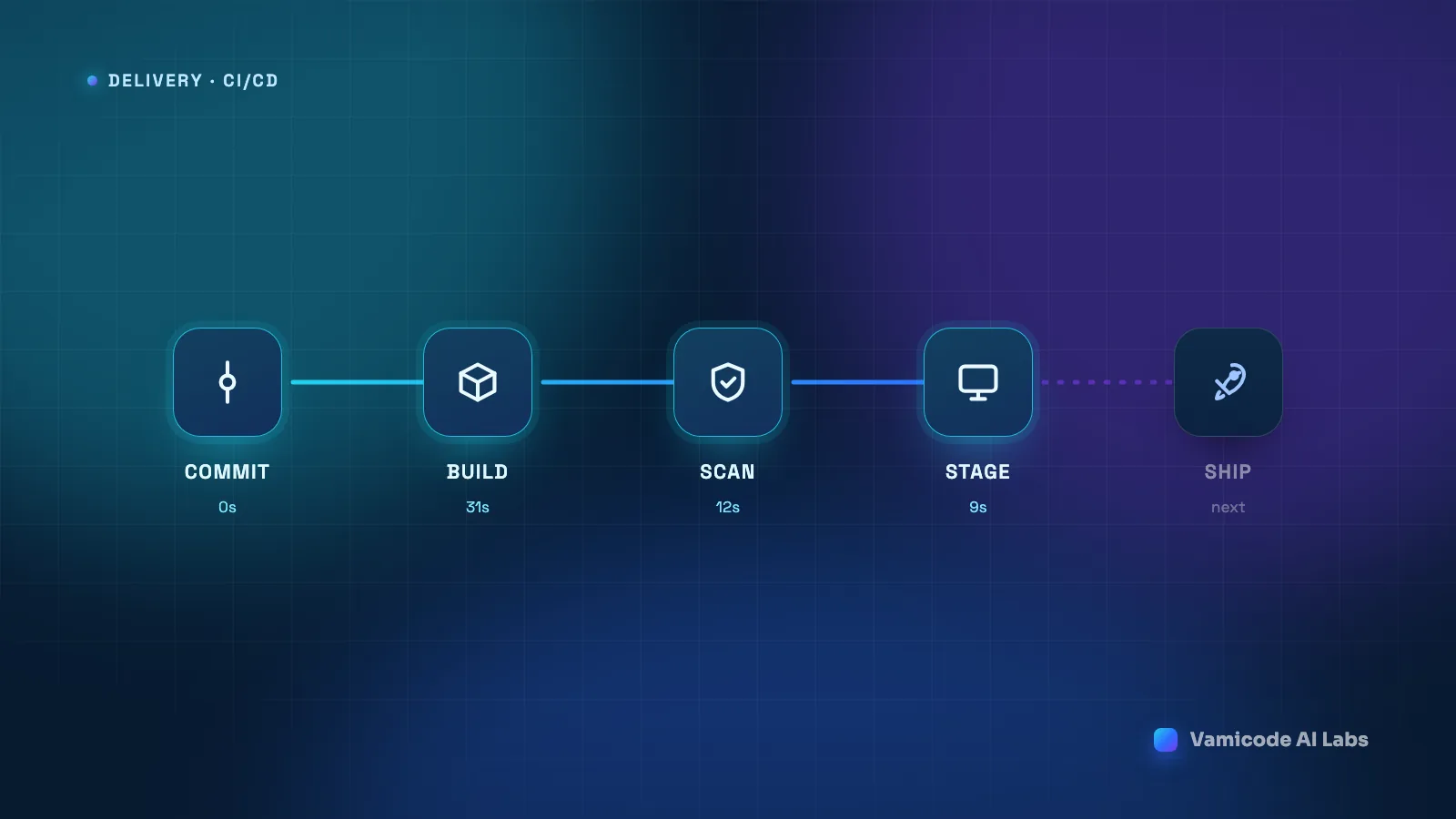
The argument for fast deploys is usually made about developer convenience. That is the least interesting reason. The real reason is that deploy speed sets batch size, and batch size sets risk.
When shipping takes forty minutes and a maintenance window, changes queue up. Three weeks of work goes out at once, something breaks, and now you are debugging forty commits at midnight with no idea which one did it. When shipping takes ninety seconds, changes go out one at a time, and a break is trivially attributable to the thing that just changed. Same code, same team, completely different failure mode.
Here is the pipeline we run for web and software delivery, and the reasoning behind each stage.
Commit: the gate that costs nothing
Everything starts on a branch, and the branch has to earn its way to main. Formatting, linting, type checks, and unit tests run before review — not because they catch deep bugs, but because they take a category of comment out of code review entirely. Nobody should be spending review attention on indentation.
Two rules keep this stage honest. Checks that fail are hard blocks, not warnings; a warning nobody can merge past is a block with extra steps, and a warning people can merge past is noise. And the whole pre-merge stage stays under two minutes, because a check developers routinely bypass has negative value.
Build: reproducible, or it does not count
The build has one job: turn a commit into an artefact that is identical everywhere it lands. Not “built again on each server” — the same bytes, promoted through environments.
That means lockfiles committed and installed with the frozen flag (npm ci, composer install --no-dev), a pinned toolchain rather than “whatever the runner has”, and no network calls during the build beyond the package registries. A build that reaches out to a live API to generate a config file is a build that will fail at the worst possible time.
The artefact gets tagged with the commit SHA and stored. Every later stage refers to it by that tag, so what you tested is provably what you shipped:
jobs:
  build:
    runs-on: ubuntu-latest
    steps:
      - uses: actions/checkout@v4
      - uses: actions/setup-node@v4
        with: { node-version: '22', cache: 'npm' }
      - run: npm ci
      - run: npm run build
      - run: tar -czf release-${GITHUB_SHA}.tgz dist/ public/ vendor/
      - uses: actions/upload-artifact@v4
        with:
          name: release-${{ github.sha }}
          path: release-${{ github.sha }}.tgz
Scan: fast checks, hard failures
Security scanning gets skipped because teams have been trained by tools that produce four hundred findings, none of them urgent. The fix is not to skip it — it is to fail on a narrow, unambiguous set and report the rest.
What blocks a deploy for us: a secret committed to the repository, a dependency with a known critical vulnerability and an available patch, and a production build containing development dependencies or source maps that were not meant to ship. What gets reported to a queue instead: everything else. Three things that always mean “stop” beat four hundred that mean “someone should look at this eventually.”
Secret scanning deserves the top slot. Of the failure modes on this list, a leaked key is the one you cannot fix by rolling back, because the moment it lands in a remote branch it has to be treated as compromised and rotated.
Stage: an environment that tells the truth
A staging environment is only worth running if a pass there means something. The ones that get ignored are ignored for good reason — they run different PHP versions, have a six-month-old database, and are missing the queue worker. Of course they disagree with production.
What we hold identical: runtime versions, the web server and its config, environment variable names, and the presence of every background service. What we deliberately keep different: real customer data, which gets replaced with a sanitised copy, and outbound integrations, which point at sandboxes so nobody gets a test invoice.
Smoke tests run against staging after every deploy — not the full suite, just the handful of paths that must never break. Homepage renders, login works, checkout reaches the payment step, the API health endpoint answers. If a smoke test fails, the artefact never gets promoted.
Ship: atomic, and reversible by design
The deploy itself should be a single instantaneous switch, not a file sync. Copying files into a live document root means there is a window — a few seconds, sometimes a few minutes — where visitors are served a half-updated application.
The release-directory pattern removes that window entirely. Unpack the artefact into a new timestamped directory, wire up shared paths, warm what needs warming, and then move a symlink. The switch is one atomic operation:
RELEASE=/var/www/releases/$(date +%Y%m%d%H%M%S)
mkdir -p "$RELEASE" && tar -xzf release.tgz -C "$RELEASE"

ln -s /var/www/shared/uploads "$RELEASE/wp-content/uploads"
ln -s /var/www/shared/.env    "$RELEASE/.env"

php "$RELEASE/artisan" migrate --force
ln -sfn "$RELEASE" /var/www/current.tmp && mv -Tf /var/www/current.tmp /var/www/current
systemctl reload php8.2-fpm

ls -1dt /var/www/releases/* | tail -n +6 | xargs rm -rf
Because the previous release is still on disk, rollback is the same symlink move pointing at the previous directory. That is the property worth designing for: rolling back should be faster and less frightening than rolling forward, so that under pressure the safe option is also the easy one.
Migrations are the part that actually bites
Code rolls back cleanly. Databases do not. A schema change that drops a column cannot be undone by pointing a symlink somewhere else, and this is where most “we can always roll back” plans quietly fall apart.
The discipline that solves it is expand and contract, and it costs one extra deploy:
- Expand. Add the new column. Leave the old one alone. Deploy. The old code still works because nothing it depends on has moved.
- Migrate. Backfill the new column and start writing to both. Deploy. Now either version of the code can run against this schema.
- Contract. Once the new code has been stable in production, drop the old column. Deploy.
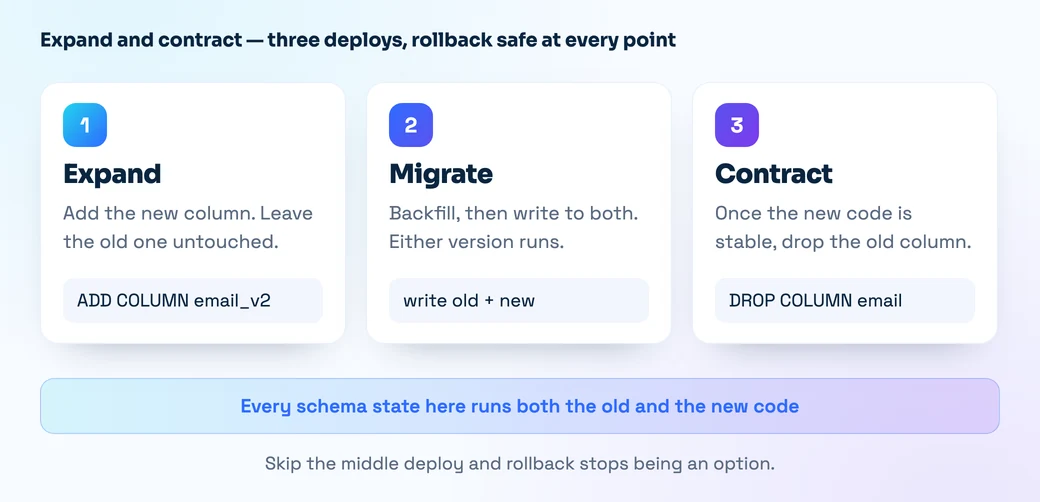
At no point is there a version of the schema that only one version of the code can run against — which is exactly what makes rollback safe. Long-running migrations get run out of band rather than in the deploy path, so a backfill over two million rows never holds a release hostage.
Keeping the whole thing fast
Pipelines slow down gradually, one reasonable addition at a time, until nobody wants to ship on a Friday. The things that keep ours quick: cache dependencies and build layers keyed on the lockfile hash; run independent jobs in parallel rather than in a chain; run the fast test suite on every commit and the slow one on merge to main; and put a hard timeout on every job, because a hung step blocking the queue for six hours is worse than a failed one.
It is also worth measuring the pipeline itself. If you cannot say what your median time from merge to production is this month versus last, you will not notice it doubling.
What this actually changes
A pipeline like this is not really about the tooling — the same shape works with GitHub Actions, GitLab CI, or a handful of shell scripts on a box. What changes is the team’s relationship to shipping.
Small changes go out the moment they are ready. A bad deploy is a ninety-second problem instead of an evening. And because rolling back is cheap, people stop batching work into a big risky release and start treating production as somewhere they visit several times a day. That shift — not the YAML — is the whole point.
If your deploys are still a scheduled event, tell us what your current process looks like and we will map out what it would take to get to a single command.